Renaissance Pet Portrait
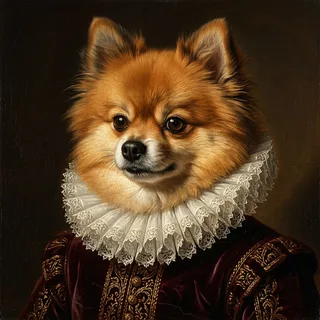
The Renaissance style puts your pet in a 16th-century Northern Renaissance portrait: three-quarter pose, warm light falling from the upper left, a velvet doublet and a white lace ruff, all against a deep umber background. It is the style people picture when they think "pet in a fancy painting", and of the set it leans hardest on costume and stagecraft.
- No account needed to preview
- No card until you buy
- Credits go on the portrait you pick
What makes a Renaissance portrait work
The style leans on chiaroscuro — a strong directional light against a deep umber background. The style specifies its own backdrop, so whatever is behind your pet in the original photo is painted out rather than kept: a cluttered kitchen or a badly lit hallway is not the obstacle it looks like.
Where the lace ruff helps and where it does not
The ruff sits directly under the chin, so the composition puts its weight on the face rather than the body — which is what you want from a portrait, and why the style suits pets whose face is the memorable part. The one case worth previewing before you commit is a very pale or white pet: the ruff is white too, and there is less separating the two than there would be for a darker coat.
Choosing a photo
- A head-on or slight three-quarter angle matches the pose the style is built around.
- Indoor photos are fine — the background is replaced with the style's dark umber backdrop.
- Photos that are very dark, heavily blurred, or where your pet is small in the frame give the weakest results.
Frequently asked
- Will my pet be wearing period clothing?
- Yes. The Renaissance style includes a velvet doublet and a white lace ruff collar as part of the composition. If you want your pet painted without clothing, the Watercolor or Oil Painting styles keep the focus on the animal itself.
- Can I use a photo where my pet is lying down?
- Usually yes. The model extrapolates a head-and-shoulders portrait from most angles, including profile and lying-down shots, as long as the face is clearly visible.
See it before you decide
You do not need an account or a card to see your first preview. Each account gets 6 free watermarked previews in total, and a credit is spent only on the portrait you pick to unlock — never on the previews. The file you unlock is the image you approved.
Create a free preview